

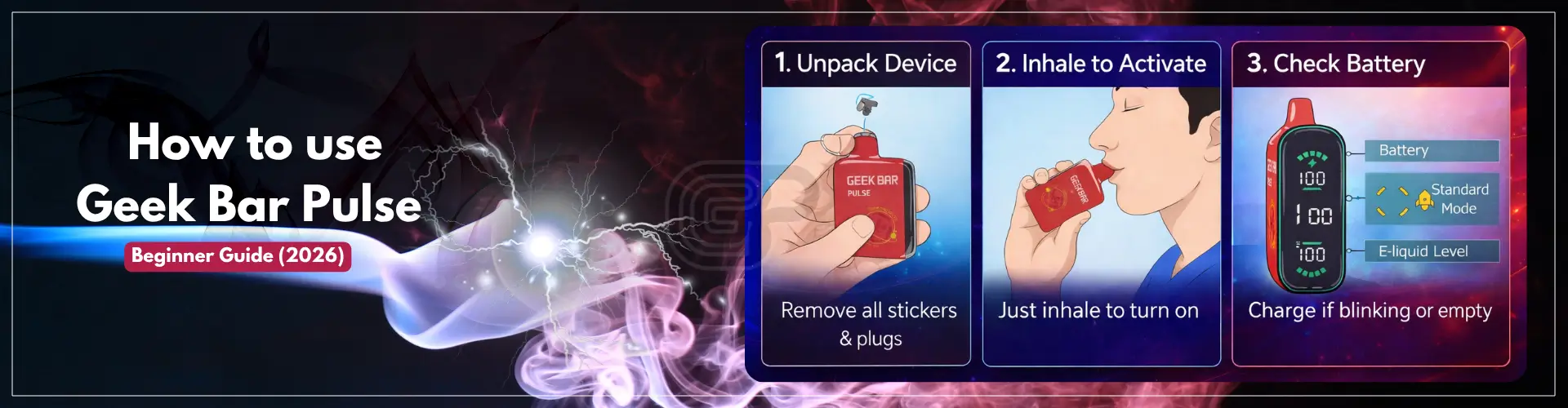
How to use Geek Bar Pulse correctly is one of the most important things for beginners who want the best performance and smooth vaping experience. If you’re using the Geek Bar Pulse for the first time, understanding the correct way to use it can improve performance and prevent common beginner mistakes.
If you want a full breakdown of features, battery, and performance, check out our complete Geek Bar Pulse guide.
Common questions like “how do I start?”, “how hard should I inhale?”, and “when should I recharge?” can create confusion for new users. This beginner guide will walk you through everything step by step so you can use your device correctly from the start.
These steps are essential if you’re wondering how to use Geek Bar Pulse properly as a beginner.
1. Unpack the Device and Remove All Packaging: Remove the device from packaging and be sure to periodically check for all silicone plugs and protective stickers on the mouthpiece. These are applied for safety reasons; if you see them still on the device, remove them before attempting to inhale from the device!
2. Inhalation activated: Drawing from the mouthpiece activates the device. If the device is set up properly, you can simply inhale from the mouthpiece without pressing any buttons.
3. Battery check: Before using the device for the first time, check the battery level to ensure it is charged. If you have not used your device for an extended period, it may need to be charged before use.
Check out the Geek Bar Pulse charging guide to ensure correct charging.
4. Make Gentle Initial Inhalations: Before taking your first few puffs, draw gently from the device until you have determined that vapor is being produced correctly. From there, follow your own personal comfort for inhaling from the device.
This quick table explains how to use Geek Bar Pulse step by step for beginners:
| Step | What to Do | Why It Matters |
|---|---|---|
| Unpack Device | Remove all stickers and plugs | Ensures proper airflow and activation |
| Inhale to Activate | No buttons required | Device uses auto-draw system |
| Check Battery | Charge if needed | Prevents weak vapor or blinking |
| Start with Gentle Puffs | Take short, slow inhales | Avoids harsh hits and improves flavor |
One of the biggest mistakes new users make is inhaling incorrectly using this device. Instead of taking harsh drags from the vape, you should be taking gentle puffs.
Just gently pull the vapor into your mouth and then inhale into your lungs if you feel comfortable. Pulling too hard on the vape will also flood the coil and will give you less flavor and can even make you cough. By taking a relaxed drag, you will get more vapor with less irritation.
You can also change up the length of your puff. As a beginner, it’s best to start with very short puffs and work your way up to longer ones.
Avoid chain vaping as this can cause your coil to overheat and cause a decrease in flavor.
Give the device a few seconds of rest between puffs in order to allow the device to cool down and reset. Learning how to inhale properly is one of the most important parts of using a Geek Bar Pulse correctly, especially for beginners.
Learning how to use Geek Bar Pulse properly will help you get better flavor, smoother hits, and longer device life.
If you’re a newbie, any mistakes can affect how good or bad of an experience you will have when using your device. This beginner guide helps you with most common mistakes to stay away from:
Inhaling too much – When you take a strong pull, it can cause the coil to become flooded and cause less flavor and possibly coughing. Always inhale slowly.
Chain vaping – Taking continuous puffs without giving your device time to cool down will cause your device to overheat, and you’ll get a burnt taste.
Not properly charging your battery – If you allow your battery to die completely or not charging your battery properly can have serious repercussions.
Ignoring blinking signals– Your device might have warning lights, blinking lights on a screen, or other indicators. These usually mean that there is something wrong with the battery level.
Here are common Geek Bar Pulse problems and how to fix them:
| Problem | Possible Cause | Fix |
|---|---|---|
| No vapor | Low battery | Charge the device |
| Harsh hit | Strong or long inhales | Take gentle, shorter puffs |
| Burnt taste | Chain vaping | Let the device cool between puffs |
| Blinking light | Battery low or device signal | Check blinking meaning guide |
If your device is not behaving the way it is supposed to, check this Geek Bar Pulse not hitting for instant troubleshooting help.
To figure out what the different lights or signals on your device mean, check Geek Bar Pulse blinking.
When using the device correctly, you will have a positive presence of vapor from the very first hit. You should not have to work hard for vaporization and should be able to control how much air you inhale.
A good sign that you’re using your Geek Bar Pulse correctly is that the vapor is consistently smooth. If the air flow feels good and not restrictive, you should experience no harshness to your throat when you inhale vapor.
You should taste no burnt flavor from the vapor that you consume. If you do, the device is likely too hot, or you have not used it properly.
Some additional signs that your experience is positive:
The flavor is clean, not muted or odd
You are able to take an inhalation
If every sign feels right to you, you have used the device properly and received the best possible experience.
Nicotine is an addiction and can be more potent than users expect. For newcomers, start off slowly.
Abstain from taking several puffs in a short period of time so that you do not have harsh hits or discomfort.
Take breaks between sessions. Allow your body time to acclimate to using the device.
If you experience dizziness or headache then this could indicate too much nicotine and should discontinue use immediately.
To use Geek Bar Pulse, remove all packaging, inhale gently to activate the device, and start with short puffs. Make sure the battery is charged before first use.
Blinking usually indicates low battery, charging status, or a safety protection trigger. Charging the device or allowing it to cool down typically resolves the issue.
If the device is not hitting, it may be due to low battery, airflow blockage, or sensor issues. Checking airflow and charging the device can help fix the problem.
Beginners should take gentle puffs lasting 1–3 seconds. Avoid long or strong inhales to prevent harsh hits and coil flooding.
It is recommended to avoid using the device while charging to prevent overheating and to protect battery health.
If your device produces smooth vapor, consistent flavor, and no blinking issues, it is working correctly. Any blinking or weak vapor usually indicates a battery or usage issue.
Still thinking how to use Geek Bar Pulse? If you’re new to something, it might be confusing at first, but give a benefit of doubt as the things are much easier. This device is built to be quite easy to figure out. Most new users develop comfort quickly through minor adjustments like their draw method and how they puff.
The most important thing is to keep it simple, to draw slowly, not to use it excessively, and only use the more powerful modes when you feel ready. These little habits will contribute to much better taste and help make the device more comfortable overall.
After you’ve become accustomed to using the device, it can be one of the easiest and least maintenance required devices to use on an everyday basis.
Once you understand how to use Geek Bar Pulse properly, you’ll get the best performance, flavor, and overall experience from your device.