

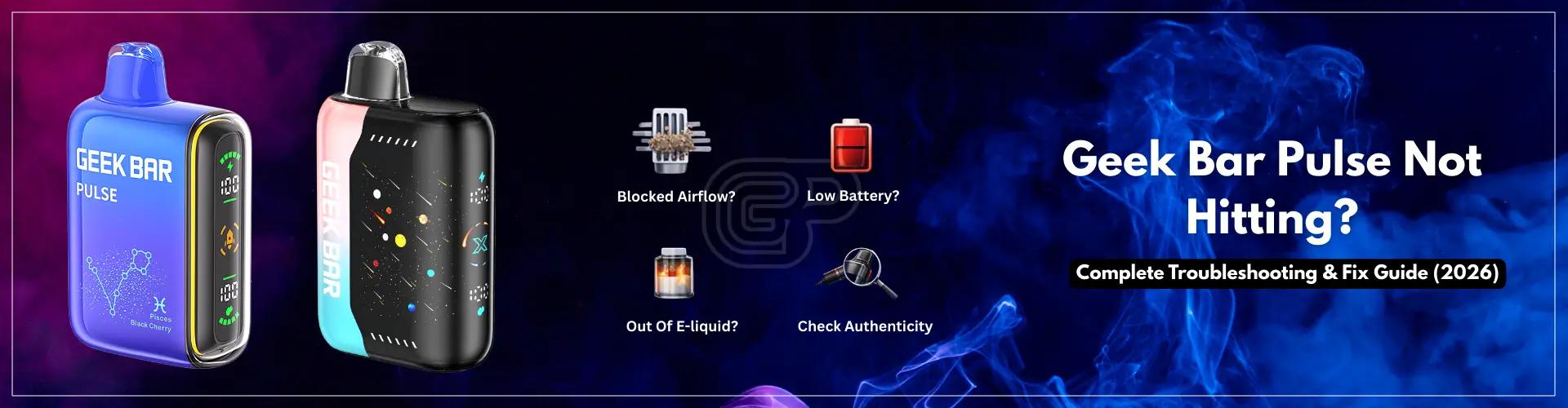
If you are experiencing a Geek Bar Pulse not hitting issue, you are in the right place. Many users report that their device lights up but produces no vapor or fails to activate properly.
If you’re looking for a complete overview of device features and specifications, visit our full Geek Bar Pulse guide. This page focuses specifically on troubleshooting problems only.
Most performance problems with Geek Bars occur due to airflow blockages from lint and other debris trapped in the e-liquid tank caused by liquid entering the device incorrectly. This troubleshooting guide provides step-by-step instructions on how to diagnose and resolve any ‘geek bar pulse not hitting’ related problems. It will provide you with easy troubleshooting methods you can perform in minutes to help determine if the issue is minor and temporary.
If your Geek Bar Pulse isn’t producing vapor when you’re taking hits from it, then there are a handful of things that can cause this to happen. Most of these problems are not serious and only take a moment to troubleshoot.
The most common culprit to vapor not producing when you hit it is airflow restriction. With disposable devices like the Geek Bar Pulse, there are tiny air intake holes that activate the auto-draw feature. If these intake holes are blocked due to dust, lint, pocket dirt, or your fingers while taking a draw, the auto-draw may activate and light up but produce little to no vapor.
Your Geek Bar Pulse may flash or light up when it has a dead battery or a battery that cannot hold a charge, but will not produce vapor.
The Geek Bar Pulse uses a draw-activated firing mechanism. In case, the auto-draw sensor is covered with condensate or is not detecting airflow properly for any reason, this may cause the device to not activate when you inhale. This may give the appearance of the Geek Bar being completely unresponsive.
Your Geek Bar Pulse may produce no vapor if the internal e-liquid has been completely depleted, even if it still lights up.
In very rare instances, an internal failure may happen right out of the box. If none of the common issues listed has happened, and the device appears to have never worked correctly, then the problem may be a manufacturing defect.
This basic checklist will help you figure out if your device is actually defective. Many times “Geek Bar Pulse not working” issues are resolved in less than two minutes simply by checking these basic steps.
| Issue | Most Likely Cause | Quick Fix |
|---|---|---|
| Lights on but no vapor | Blocked airflow | Clean air vents and avoid covering intake holes |
| Blinking but not hitting | Low battery or protection mode | Recharge fully and let device rest |
| Burnt taste | E-liquid depleted | Device may be empty |
| No response at all | Sensor interference | Take slow steady draw and check airflow |
Some units come with small silicone plugs or air flow stickers covering the mouthpiece or air intake holes. If the stickers are not fully removed, then air flow will be restricted and the device will not fire.If you’re using the device for the first time, make sure you follow the correct steps to use Geek Bar Pulse properly, as improper setup is one of the most common reasons it may not hit.
Check the bottom and side air intakes for lint, dust or debris in your pocket that may be blocking the air intake. A partially blocked air intake will not allow for proper suction detection and a reduction in vapor production. Also, make sure your device has enough battery. If you’re unsure, follow this complete Geek Bar Pulse charging guide to ensure it’s charging correctly.
To move the e-liquid that has become air-locked inside of your device due to it being idle for a period of time you can try giving the device a gentle tap against your hand or another flat surface. This will help move any air bubble back toward the e-liquid thus allowing it to reach the heating element.
If you are still able to turn on your Geek Bar and get nothing but a lit up light without producing any vapor then you may be out of e-liquid, and this could indicate Geek bar pulse battery issue.
After you have checked these three things on your pulse model, you should be able to get your device to work properly.
Try doing an external visual inspection.
If necessary, gently wipe down the outside air flow holes of your device using a dry cloth or soft bristle brush; do NOT use anything sharp to clean inside your device.
The device should be held in an upright position with light taps made to the palm of the hand. This will:
Do not shake the device aggressively. Gentle taps will provide you with all the help you need.
If you used the device heavily before it stopped working, it could have gone into an internal protection feature. Lay it down for 5 to 10 minutes. This could bring the device back to working condition due to an overheating of the device or a short circuit protection. Do not attempt to force the device on during this time.
If your Geek Bar Pulse blinking but not hitting then complete the steps below:
Sometimes the device may blink but fail to produce vapor when the battery is too low or the airflow is blocked. If you want to understand what different blinking signals mean, see our Geek Bar Pulse blinking guide.
There are many performance-related issues that can be fixed by following the correct troubleshooting procedures. But, there are also cases where you need to stop using your device instantly.
If your device is getting too hot during usage or just sitting on the table, you should stop using it immediately. It’s common for devices to feel warm when they’re being used normally, but excessive heating can mean there’s an issue with the battery or coil.
A continual burnt or electrical odor from your device is a warning sign. It could indicate that you’ve burnt out your coil, have created an internal short-circuit in the device, or have completely consumed the e-liquid in your device. Continuing to use the device in this condition may cause further damage to the device’s internal parts and build additional risk.
If you see e-liquid leaking out of the mouthpiece or from the bottom airflow region of the device, this is an abnormal situation. Leaks can impact both the auto-draw sensor of the device, and can also affect the battery compartment.
If you notice that the device has started to swell up, bulge or deform physically in any manner, do not use it and do not attempt to charge it either.
Some problems that seem to be caused by wear and/or airflow problems can be linked to a fake device. Fake disposable devices typically have cheaper internal parts, inconsistent batteries, or improperly calibrated auto-detection sensors; thus they can blink with no vapor, deliver few hits, fail to turn on and/or not work at all.
If you got your Geek Bar Pulse from some sort of marketplace that is not affiliated with them or your product packaging looks and feels different than it did before or produces poor performance when compared to previous versions, then you should investigate its authenticity; just because a product looks similar doesn’t mean that it behaves exactly the same once used.
If you suspect authenticity could be the issue, refer to our detailed guide on how to tell if Geek Bar Pulse is fake or real. This will help you determine whether the issue is performance-related or authenticity-related.
Keeping your device in a temperature controlled environment will help a steady output from your battery along with smooth vapor production.
Be aware of the way you grasp your device when you are taking a puff. Blocking the air vent openings with your fingers will often restrict airflow. If the Geek Bar Pulse auto draw not working then hold your device in a loose manner. This will help the airflow sensing to work properly and will cause the device to activate in a consistent manner.
When you purchase your devices from reputable authorized retailers like Geekbarpulse.com, the risk of purchasing an imitation or poorly stored device is greatly decreased. Authentic devices typically provide consistency in performance and meet manufacturers’ standards of quality.
For a broader perspective, refer to the full product guide for the Geek Bar Pulse to enhance your experience with this product right off the bat.
There are several reasons why your Geek Bar Pulse could create no vapor; blocked air holes, low e-liquid, low battery, or malfunctioning auto-draw. Check for blockages in the air holes and charge your device if needed and make sure your device has not reached its puff limit.
To improve Geek Bar Pulse blocked airflow, check ventilation holes located on the bottom and sides of the device for moisture or dirt. Now, use a soft lint-free cloth to clean the outside surface around all ventilation holes. Proper airflow detection is very important for activating the auto-draw feature of the device.
Yes. Puff amounts indicated on the bar are an average amount of puffs determined by how frequently you take draws from your Pulse model, the strength of each draw from your Geek bar Pulse, and any other outside factors. Some heavy draws or chain vaping, and/or social situations may cause the actual number of puffs used to be less than anticipated puffs.
If the device is lit up, but no vapour is produced and has a burnt taste, the device is probably empty. However, if you have just started using the Pulse disposable and it has never produced vapor, it may have a manufacturing defect as a result of this malfunctioning.
If your device shows signs of battery swelling, leaking, overheating, or burning odor, discontinue use immediately. Do not attempt to open or repair disposable devices, as this may cause safety risks.
There are many issues that can cause your Geek Bar Pulse not to be functional. Typically, the problems are often very small in nature and can usually be fixed within a matter of minutes. Some very common Geek Bar Pulse airflow issues are blockages, dead batteries, and temp sensor interference; however, very rarely will users experience permanent problems with their devices.
If you have completed all troubleshooting steps above and the device still does not function properly, it may have reached the end of its usable lifespan.
Written by Mikey Johnson, a U.S.-based vape reviewer specializing in Geek Bar devices. With 5+ years of experience testing disposable vapes, he focuses on real-world insights like flavor performance, battery life, and value. [ View full author profile →]
Geek Bar Pulse — Disposable Vape
🛒 Where to Buy Online
Choose from our verified partner stores — all carry 100% authentic Geek Bar Pulse products sourced directly from official US distributors.


Twelve Tribes
Wide Selection • Best Prices

Raven Route
Fast Delivery • All Flavors


Zippyzz
Quick Shipping • Great Deals
🔒 All partner stores are verified, age-gated, and ship only to legal US states. Purchases are made directly with the retailer — not geekbarpulse.com.
⚠️ Must be 21+ to purchase.