

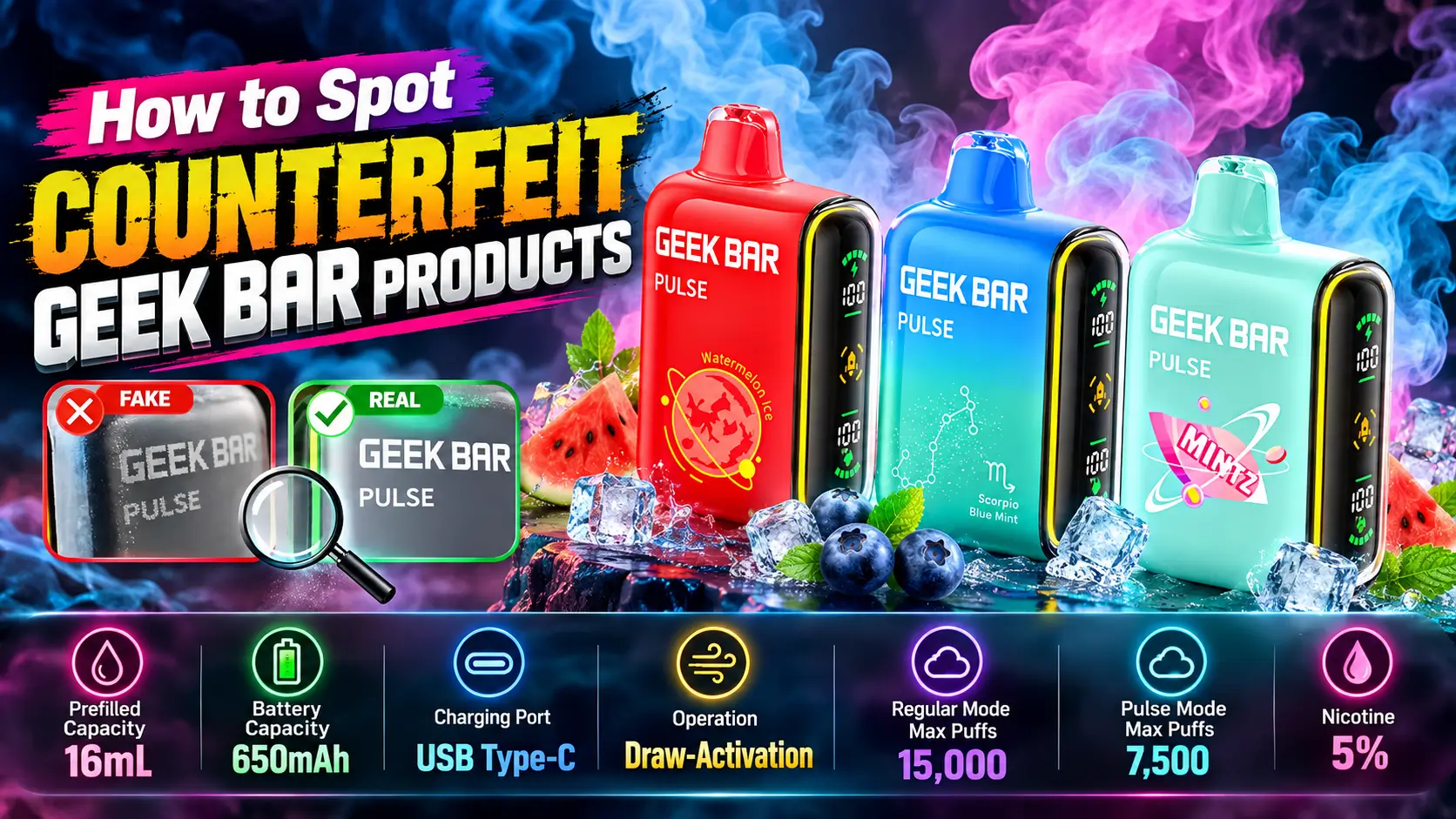
Counterfeit Geek Bar products are out there, and the good ones are built to fool you at a glance. A fake can copy the box, the logo, and even the flavor name, yet still run unverified e-liquid and a cheap battery. That is a bad trade for a few saved dollars.
This guide walks through seven checks you can do in minutes, from packaging and QR codes to seller red flags. Every tip applies to the Geek Bar Pulse and helps with other Geek Bar models too. You will also find the official Pulse specs, a genuine-versus-fake comparison table, and clear steps for what to do if something feels wrong.
📋 Table of Contents
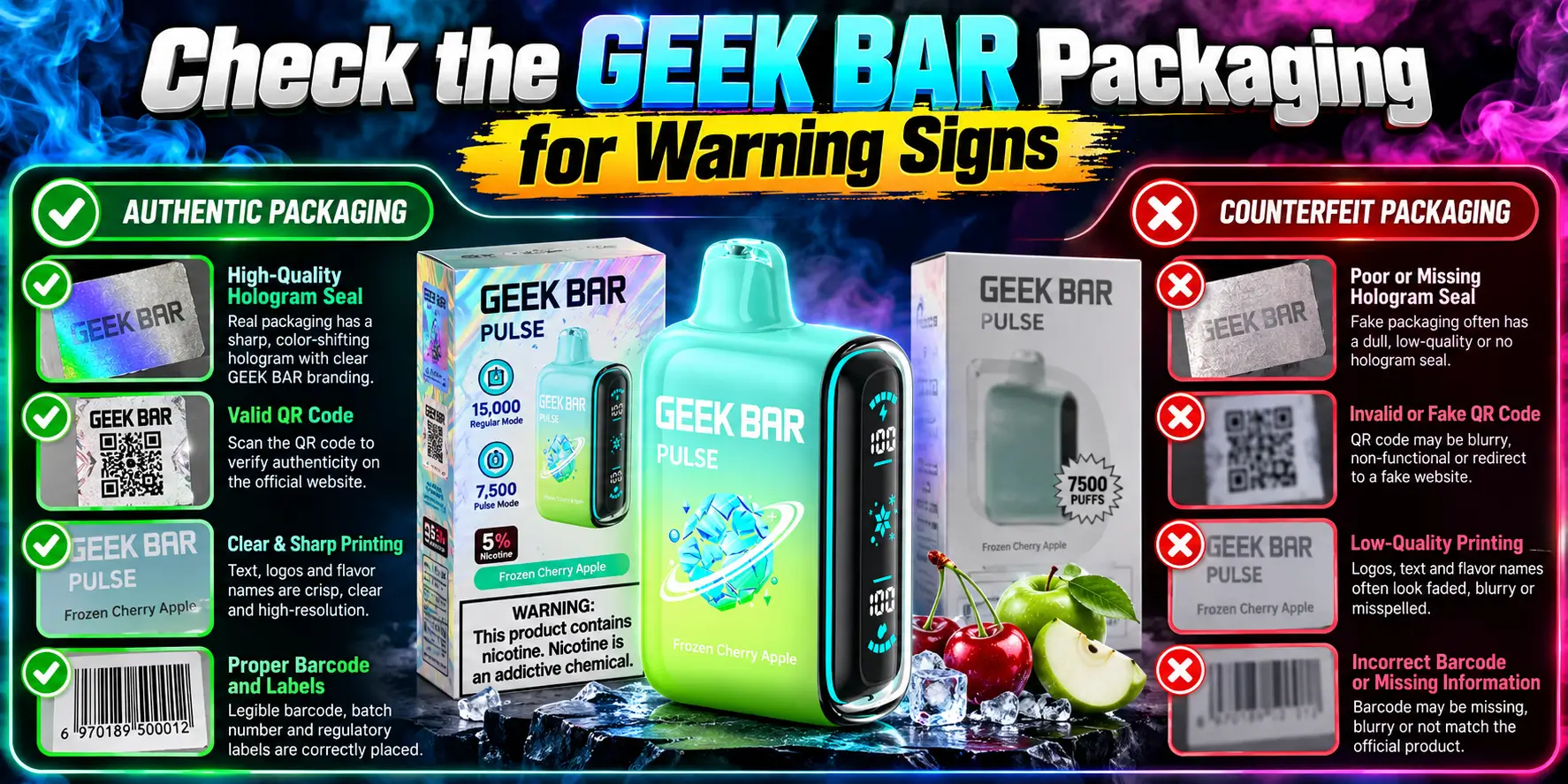
Start with the box. Genuine packaging looks sharp, consistent, and complete. Fake packaging usually slips somewhere small, like a wrong color, a missing panel, or a warning label in the wrong spot.
Two minutes with the box in your hands beats any guesswork later. If you want the full brand background first, our Geek Bar Guide covers the lineup and how each model differs.
Pull up official product photos from the brand or a verified retailer, then hold the box next to your screen. Compare the color shades, logo placement, panel layout, and the finish, matte versus glossy.
A box that feels thin, crushed, or oddly light is a flag. So is shrink wrap that looks loose, torn, or resealed. Factory wrap is tight and clean, not wrinkled like a gift someone re-wrapped.
Every real box carries a full set of product details, and those details must match the device. For the Geek Bar Pulse, that means 16mL of prefilled e-liquid, 5% nicotine, and a puff rating of up to 15,000 in Regular Mode.
Products sold in the U.S. should also carry the FDA-required nicotine warning. If the box lists a different capacity, a random puff count, or no warning at all, treat it as a red flag and keep checking.
Also compare the box to the device inside. The flavor, model name, and nicotine strength printed on the outside should match the label on the vape itself. A mismatch between the two suggests the box and the device came from different places, which never happens with a real factory pack.
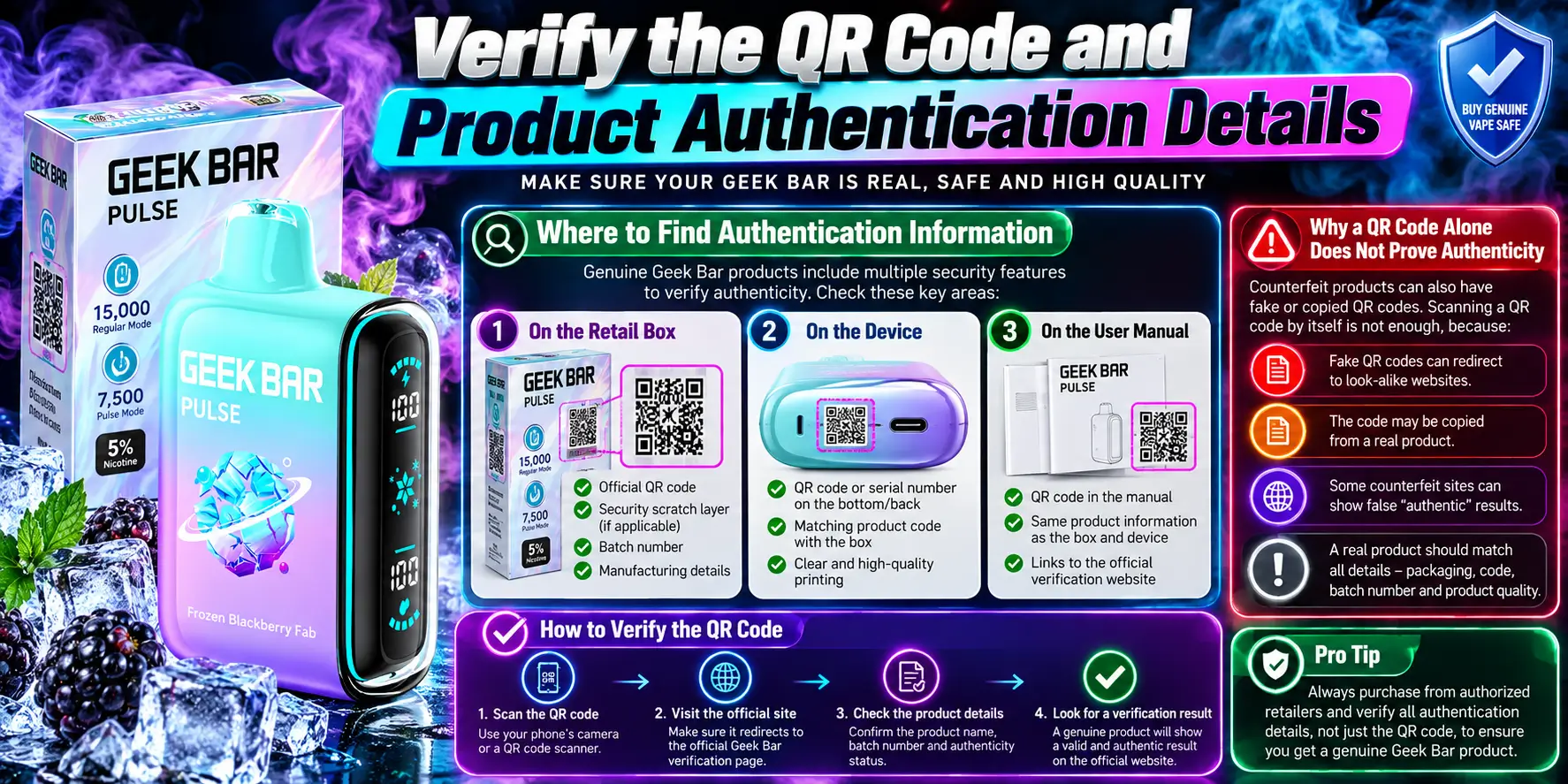
Scan the QR code, scratch the security layer, and confirm the result on the official Geek Bar website. Geek Bar runs its own anti-counterfeit system, and it is the fastest single check you can make.
One rule matters more than the rest: make sure you land on the real geekbar.com. Type the address yourself if you feel unsure about where a scan sends you.
Look on the side or back panel of the retail box for a scratch-off security area near the QR code. Geek Bar has said both its older and newer codes stay valid while it rolls out an upgraded system.
The two versions work a little differently:
The newer code verifies only once. On a second attempt, the page shows the time of the first check, so you can compare it with your purchase time. If that time comes before you ever bought the box, ask the seller some hard questions.
A QR code proves very little by itself. Security researchers describe plain QR codes as weak authentication because anyone can copy them, and they protect against counterfeits only when the scan data gets analyzed behind the scenes.
Counterfeiters know this. Some print working QR codes that open a lookalike page, and vape retailers report fakes that reuse the same code across many devices. That is why the scratch code and the official domain matter more than the QR image itself.
A scan that opens a strange address, a page with typos, or a "verified" message that looks too eager is a warning. When in doubt, skip the scan link and go to the brand site directly.
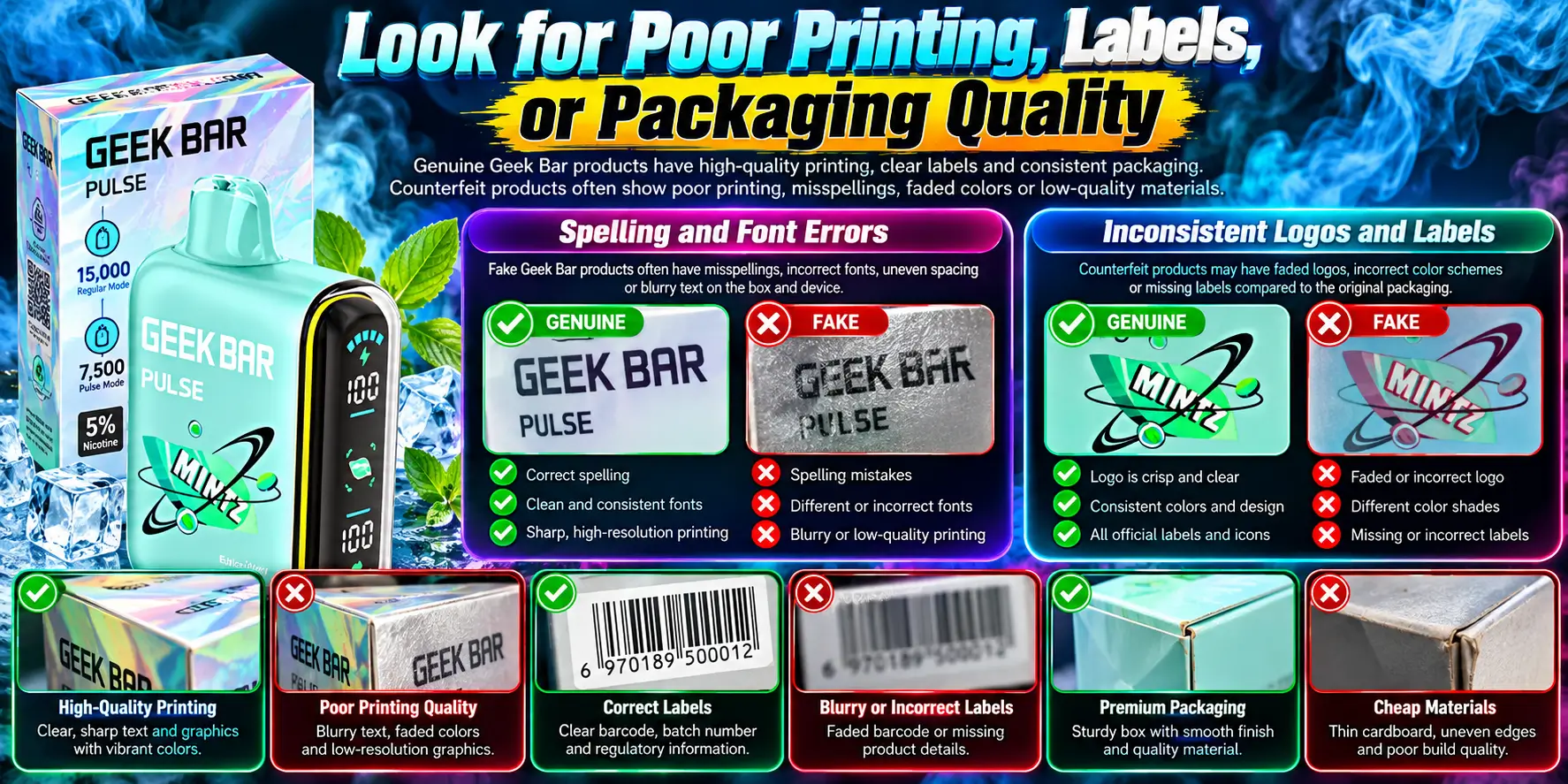
Printing is where counterfeits cut corners. Genuine packaging has crisp text, clean edges, and evenly applied labels, while fakes often show blur, smudges, or crooked stickers.
Lean in close and use good light. A phone flashlight reveals a lot.
Read every line on the box, including the tiny legal text. Misspelled words, odd capitalization, mismatched font weights, and awkward phrasing are classic signs of a rushed copy.
Check the flavor name and the model name too. A brand-new device with "Pulz" or a warning statement missing a word did not come from a careful factory.
Logos should look identical everywhere they appear on the box and the device. Pixelated edges, faded colors, or a logo that sits slightly off-center on one panel tell you the artwork got copied from a low-resolution image.
Barcodes and sticker labels deserve the same scrutiny. Look for peeling corners, glue residue, uneven spacing, or barcodes that look fuzzy. Real labels sit flat and stay put.
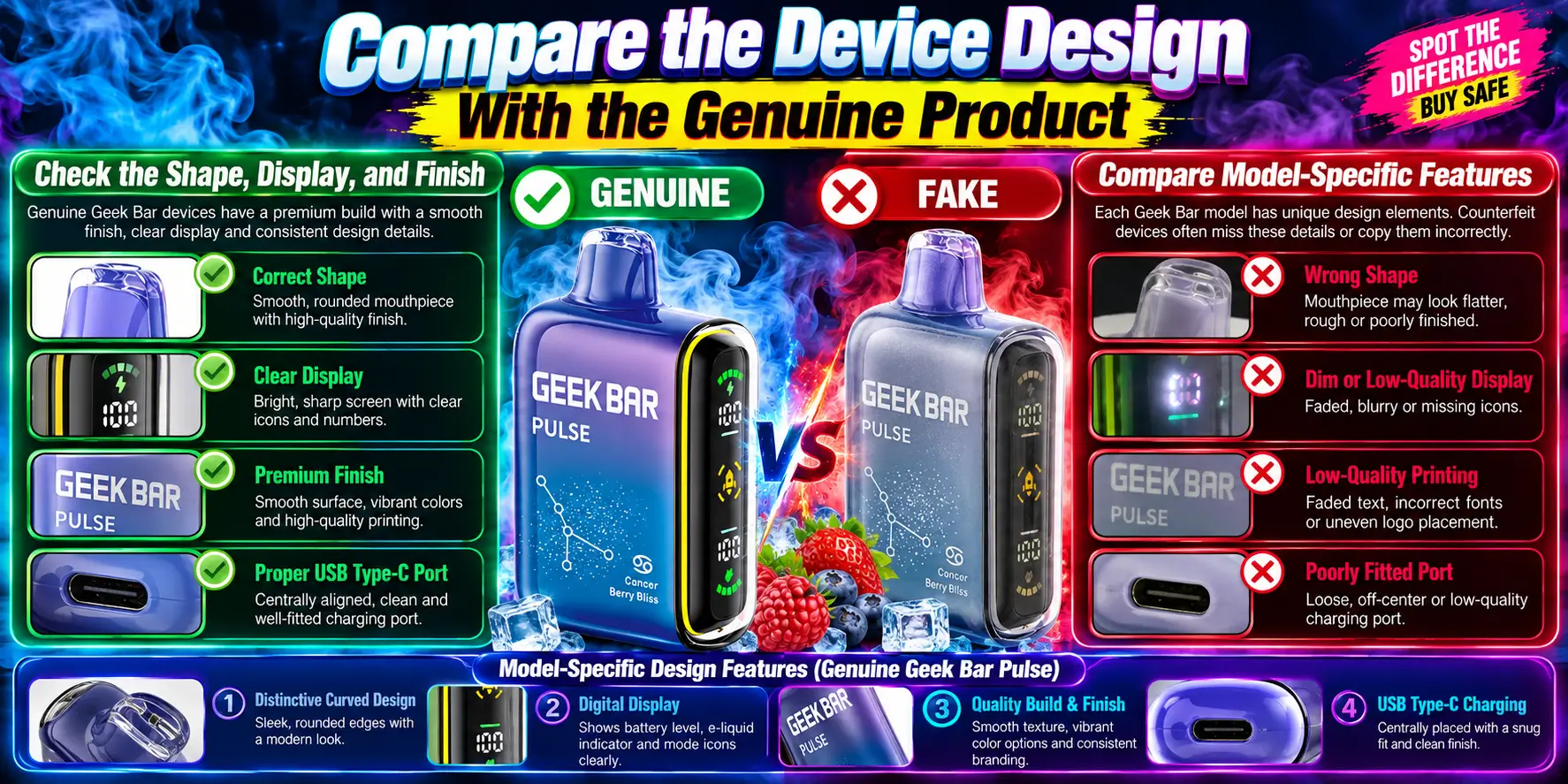
Your hands can catch what your eyes miss. A genuine device feels solid, with tight seams, an even finish, and a display that works cleanly. Counterfeit hardware often feels lighter, rattles, or shows rough edges.
Run your fingers along the body. Gaps between the shell pieces, rough seams, paint that looks patchy, or a mouthpiece that wobbles all point to lower build quality.
Then check the screen. It should light up cleanly, show readable battery and e-liquid information, and stay steady. Our Geek Bar Pulse Screen Explained guide breaks down what each indicator should look like, so you know what "normal" is.
Every model has a spec sheet, and a fake has to guess at it. Here are the official Geek Bar Pulse specifications to hold your device against:
| Spec | Details |
|---|---|
| Prefilled Capacity | 16 mL |
| Battery Capacity | 650 mAh |
| Charging Port | USB Type-C |
| Operation | Draw-Activation |
| Regular Mode Max Puffs | 15,000 |
| Pulse Mode Max Puffs | 7,500 |
| Nicotine | 5% |
Use the table like a checklist. A genuine Pulse charges through a USB-C port and fires when you inhale, with no button to press. If your device asks for a button press or uses a different port, something is off.
Puff claims deserve a second look as well. Our Geek Bar Pulse puff count guide explains how those ratings work, and a box promising far more than the spec sheet suggests is usually bluffing. Charging behavior offers another clue, and the Geek Bar Pulse Charging Instructions show what normal looks like.
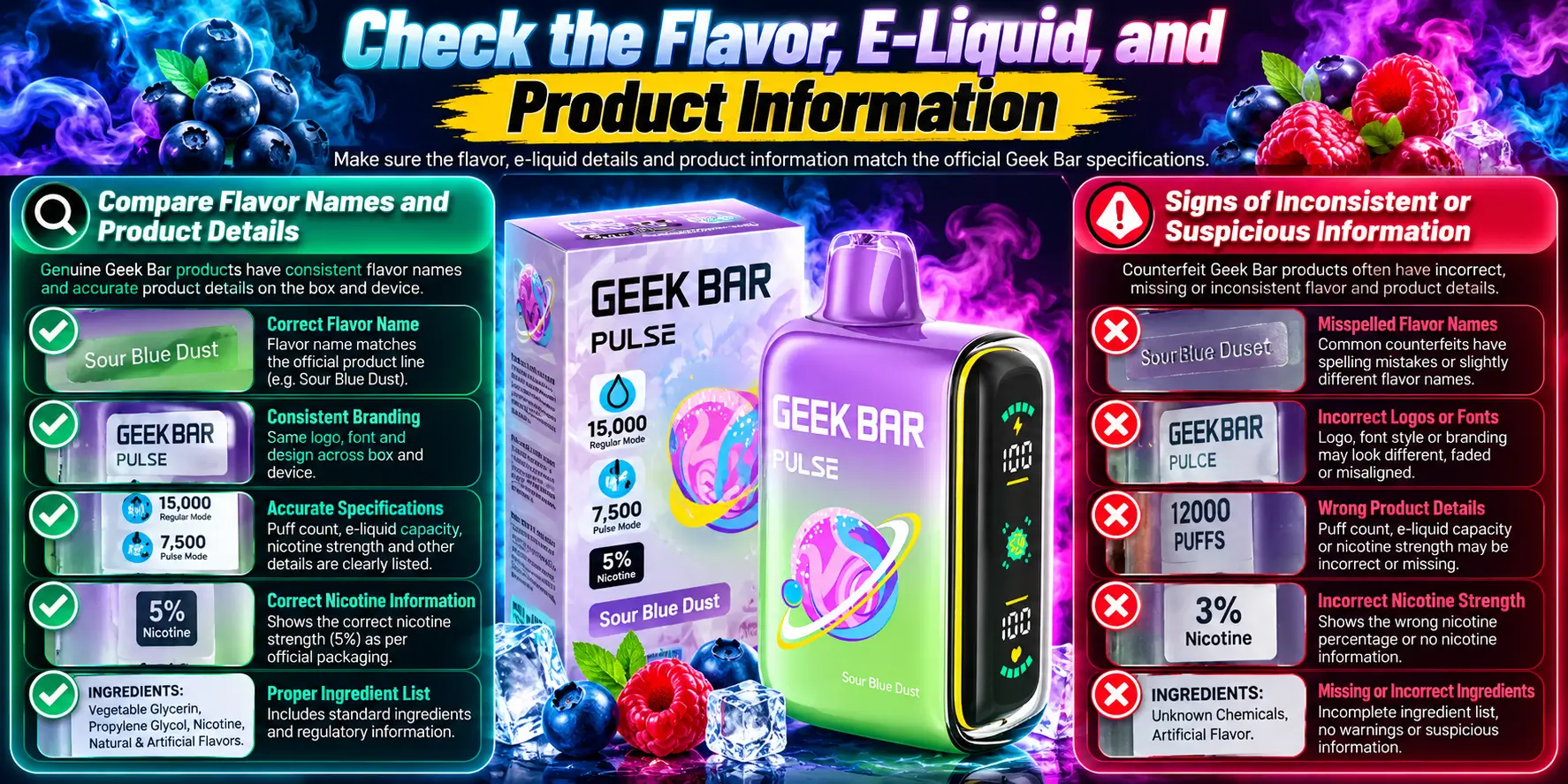
A real device tastes like its label and behaves like its spec sheet. Harsh, chemical, or flat flavor from the first puff suggests the e-liquid is not what the box claims.
Taste is subjective, but big swings are not. Trust your senses, and stop if anything smells or tastes burnt, metallic, or sharply artificial right out of the box.
Match the flavor name on your box to the name listed by the brand and verified retailers. Watch for invented names, altered spellings, or a flavor that does not exist in the official lineup.
Check that the printed nicotine strength, capacity, and model name agree across the box, the device label, and the listing you bought from. Three sources should tell one story.
Inconsistency is the tell. A box that says 5% nicotine while the device label shows another number, a listing that promises extra puffs, or a lifespan that collapses after a day all signal trouble.
Be fair to genuine devices, though. Real hardware can still have problems, and a device that acts up is not automatically fake. If yours will not start, try the fixes in our Geek Bar Pulse Won't Turn On guide first. If the vapor feels weak, our Geek Bar Pulse Not Hitting page covers the common causes.
Lifespan is another useful measuring stick. Compare your real-world use against the estimates in How Long Does Geek Bar Pulse Last? If a device dies far sooner than any honest range, and the code check also fails, you have a strong case for a fake.
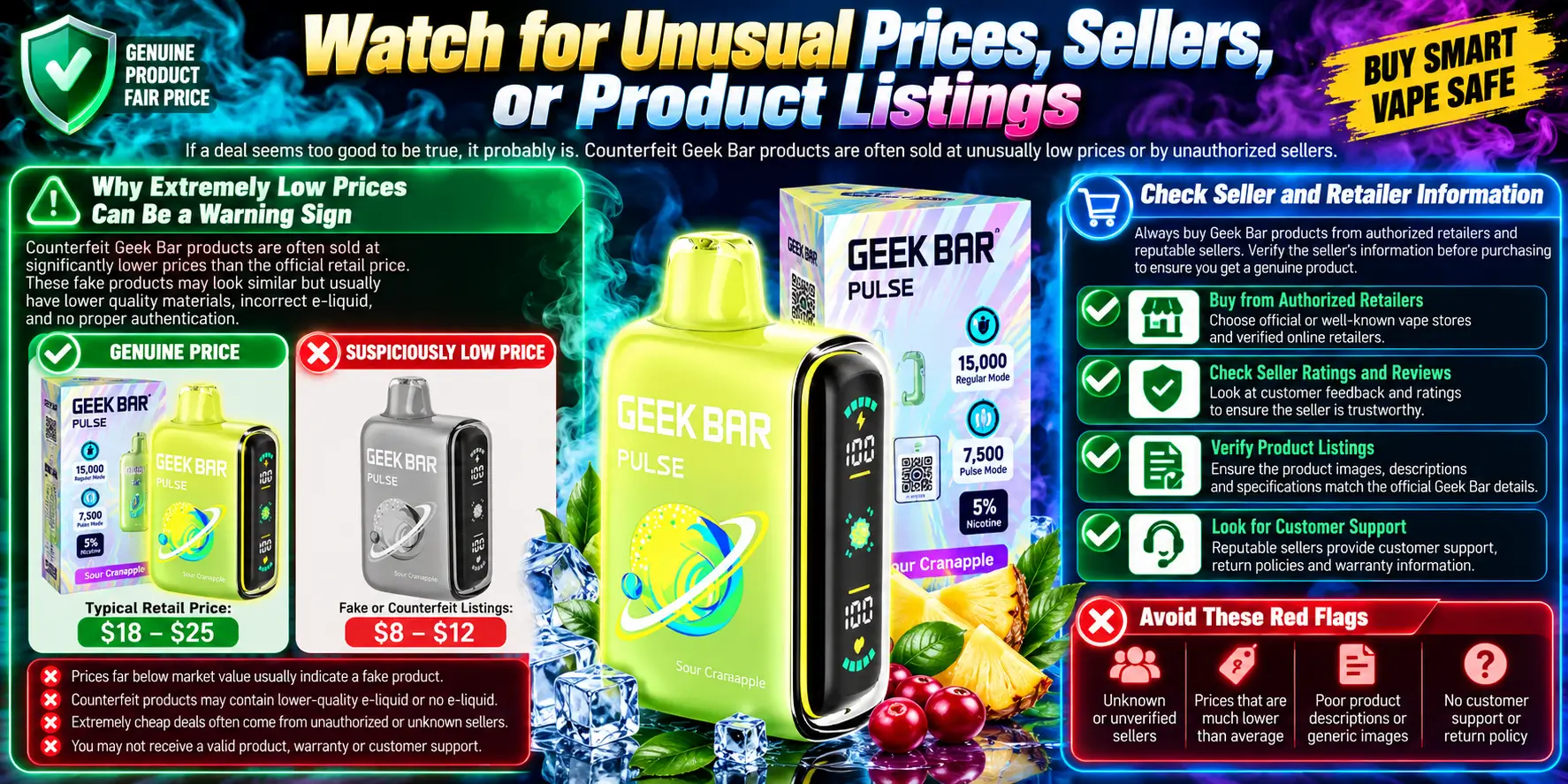
If the deal looks too good, it probably is. Counterfeiters compete on price because they skip the costs of real components, testing, and compliance.
The seller matters as much as the product. Even a perfect-looking box means little when it comes from a source you cannot trace.
Compare the price with several established retailers. A price far below the normal range, a "buy 10 for the cost of 3" pitch, or a suspiciously endless stock of every flavor should make you pause.
Federal agencies see the scale of this problem. In 2024, the FDA and U.S. Customs and Border Protection seized about three million unauthorized e-cigarette products worth an estimated $76 million, including Geek Bar-branded items. Trade reporting on that operation noted that some were direct counterfeits of brand-name devices.
Look for a real business identity: a physical address, working contact details, clear return and shipping policies, and age verification at checkout. Federal law sets the minimum age to buy vapor products at 21, so a seller that skips ID checks is ignoring the rules.
Be cautious with social media stores, unbranded marketplace listings, and sites that copy product photos but hide who runs them. Stick with verified partner stores and retailers you can contact.
Read the product listing itself with the same care. Stock photos with a different device in them, specs that do not match the official sheet, and reviews that all sound copy-pasted suggest a seller who cares more about clicks than accuracy. A trustworthy listing names the exact model, shows real details, and answers questions clearly.
Quick comparison: genuine vs. counterfeit
| Check | Genuine Geek Bar | Likely Counterfeit |
|---|---|---|
| Security code | Verifies on the official geekbar.com page | Fails, shows a strange domain, or shows an earlier check time |
| Printing | Crisp text and clean edges | Blurry, smudged, or misspelled |
| Product details | Match the official specs | Wrong capacity, nicotine, or puff claims |
| Device build | Tight seams and even finish | Loose parts, rough edges, wobbling mouthpiece |
| Charging port | USB Type-C | Different or poorly fitted port |
| Flavor | Matches the label from the first puff | Harsh, flat, or chemical taste |
| Seller | Traceable, age-verified retailer | Anonymous listing with no age check |
| Price | In line with established retailers | Far below the normal range |
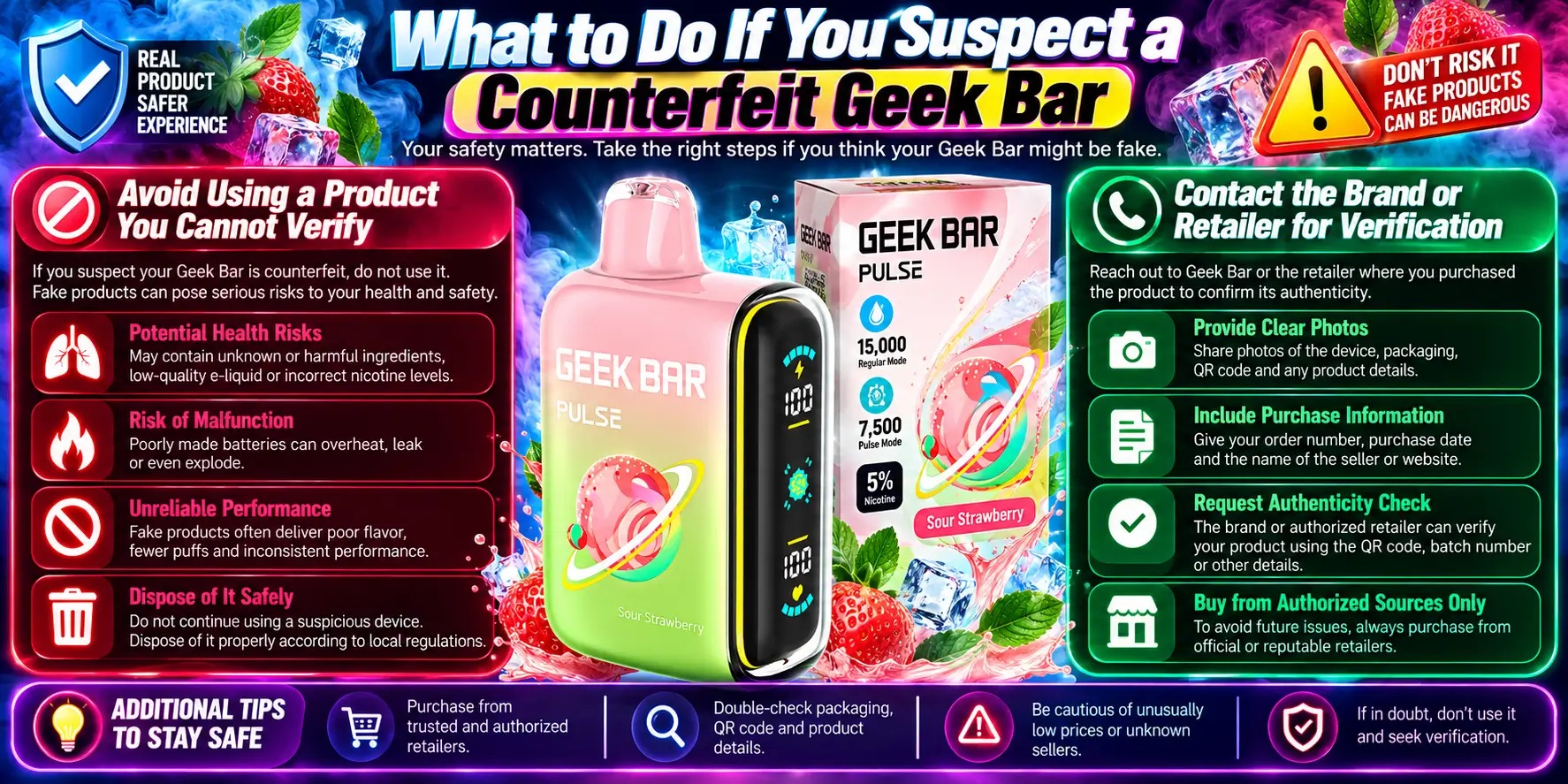
Stop using it. Do not charge it again, keep the box and receipt, and contact the seller. You lose nothing by pausing, and you might avoid a real safety problem.
Then work through the steps below in order.
Unverified devices carry two unknowns: what is in the e-liquid and how the battery was built. The FDA has warned that illegal e-cigarettes have been linked to overheating, fires, and explosions from poorly made batteries.
If the device gets hot, swells, leaks, or smells strange, move it away from anything flammable. Keep it out of hot cars and direct sun, and follow the safe habits in our Geek Bar Pulse Storage Guide. When you are ready to get rid of it, use a local battery or e-waste program instead of household trash.
Send the seller clear photos of the box, the security code area, the device label, and your order number. A legitimate retailer will help, and a shady one will stall or ignore you.
You can also contact Geek Bar through its official website to ask about a code that will not verify. If you had a physical problem, such as a burn or a battery incident, you can report it through the FDA Safety Reporting Portal.
Keep every record until the issue is resolved, including screenshots of the listing, payment confirmations, and any messages with the seller. Clear documentation speeds up refunds and helps others avoid the same source.
Finally, buy from sources you can verify next time. A few extra dollars for a traceable retailer costs far less than a device you cannot trust.
1. How can I tell if my Geek Bar is real or fake?
Check the QR code and scratch-off security code first, then confirm the result on the official geekbar.com page. After that, compare the packaging, printing, product details, and device build against genuine photos and the official specs. One failed check is a warning, and several failures usually mean a counterfeit.
2. Does a working QR code mean my Geek Bar is authentic?
No. A QR code is easy to copy, and some counterfeits print codes that open lookalike pages or reuse the same code across many devices. Scan it, then also complete the scratch-code check on the official Geek Bar website, and confirm the web address matches the real brand domain.
3. What are the official Geek Bar Pulse specifications?
The Geek Bar Pulse has a 16 mL prefilled capacity, a 650 mAh battery, a USB Type-C charging port, and draw-activated operation. It is rated for up to 15,000 puffs in Regular Mode and up to 7,500 puffs in Pulse Mode, with 5% nicotine. Any device that differs from these details deserves a closer look.
4. Is a very cheap Geek Bar always a counterfeit?
Not always, since sales and promotions happen. But a price far below established retailers is a common counterfeit signal, especially when it comes with vague seller details or no age verification. Compare several trusted stores, verify the security code, and skip any deal that avoids questions about where the stock came from.
5. What should I do if I think I bought a counterfeit Geek Bar?
Stop using it and do not recharge it. Keep the box, receipt, and photos, then contact the seller and ask for verification or a refund. You can also contact Geek Bar through its official site and report any injury or battery problem through the FDA Safety Reporting Portal.
Ready to buy? Browse the Geek Bar Pulse disposable Vape, then run the security code check on your box once it arrives.
WARNING: This product contains nicotine. Nicotine is an addictive chemical. 21+ users only.
Geek Bar Pulse — Disposable Vape
🛒 Where to Buy Online
Choose from our verified partner stores — all carry 100% authentic Geek Bar Pulse products sourced directly from official US distributors.


Twelve Tribes
Wide Selection • Best Prices


Raven Route
Fast Delivery • All Flavors

Zippyzz
Quick Shipping • Great Deals
🔒 All partner stores are verified, age-gated, and ship only to legal US states. Purchases are made directly with the retailer — not geekbarpulse.com.
⚠️ Must be 21+ to purchase.