Getting the right Geek Bar Pulse X2 settings comes down to two things: knowing which mode you're in and knowing where the airflow ring sits. This guide walks through both, plus how to read the display so you're never guessing mid-puff.
How Do Geek Bar Pulse X2 Modes Work?
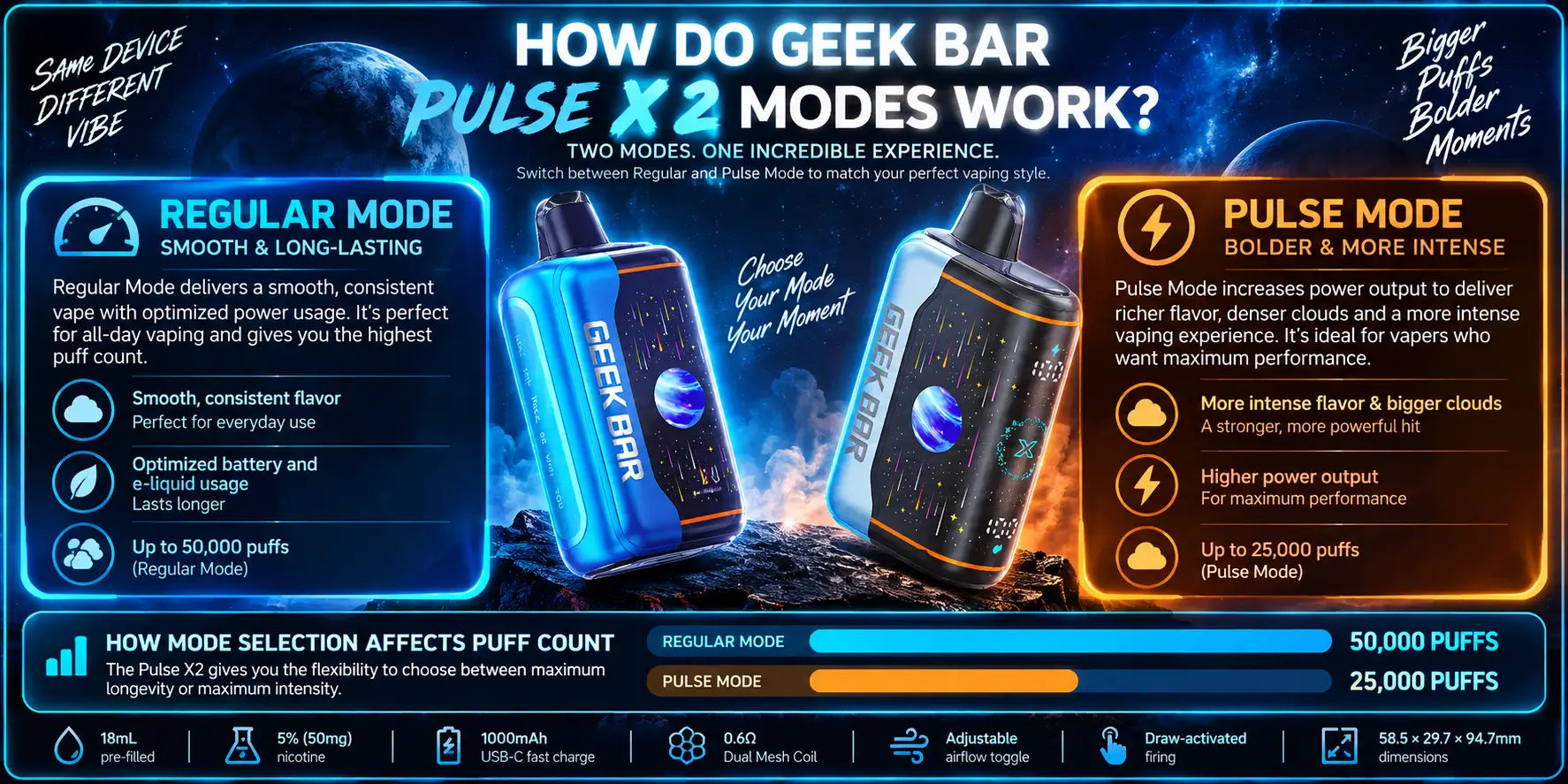
The Geek Bar Pulse X2 runs on two power settings — Regular Mode and Pulse Mode — switched with a quick click sequence on the device. Firing itself is draw-activated, so you never press a button to actually vape.
What Is Regular Mode on the Pulse X2?
Regular Mode runs the 0.6Ω dual-mesh coil at a lower, steady output. It's the default setting most users stay on, since it stretches both battery and e-liquid the furthest.
What Is Pulse Mode on the Pulse X2?
Pulse Mode boosts power to the coil for a warmer draw and thicker cloud. It draws more from the 1000mAh battery per puff, trading longevity for intensity.
How Mode Selection Affects Puff Count
Mode choice sets the ceiling on how long the device lasts. Regular Mode is rated for up to 50,000 puffs, while Pulse Mode is rated for up to 25,000 puffs, since the higher wattage burns through the 18mL e-liquid faster.
Regular Mode vs Pulse Mode: What's the Difference?
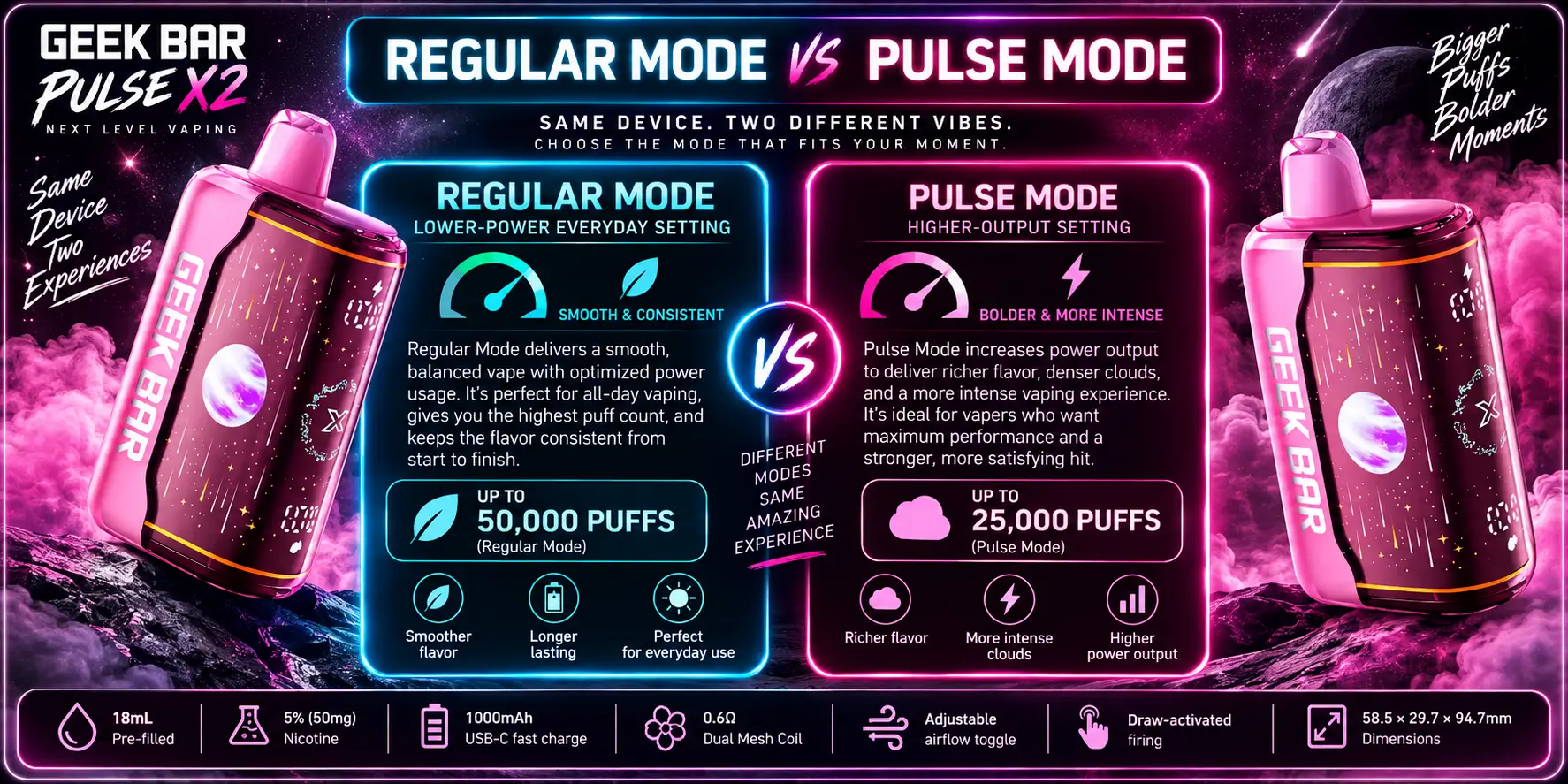
Both modes share the same coil and tank, but output and pacing differ sharply. Here's the side-by-side:
| Feature | Regular Mode | Pulse Mode |
|---|---|---|
| Puff Count | Up to 50,000 puffs | Up to 25,000 puffs |
| Power Output | Lower, steady | Higher, boosted |
| Draw Feel | Smooth, everyday | Warm, intense |
| Best For | All-day vaping | Stronger hits |
Regular Mode: Lower-Power Everyday Setting
Regular Mode keeps the dual-mesh coil at a conservative wattage. It's the setting most reviewers recommend by default, since it balances flavor and puff count without draining the tank early.
Pulse Mode: Higher-Output Setting
Pulse Mode pushes more power through the same 0.6Ω coil setup. Expect thicker clouds and a noticeably warmer draw, but a faster drop in both battery and e-liquid indicators.
How to Adjust the Geek Bar Pulse X2 Airflow
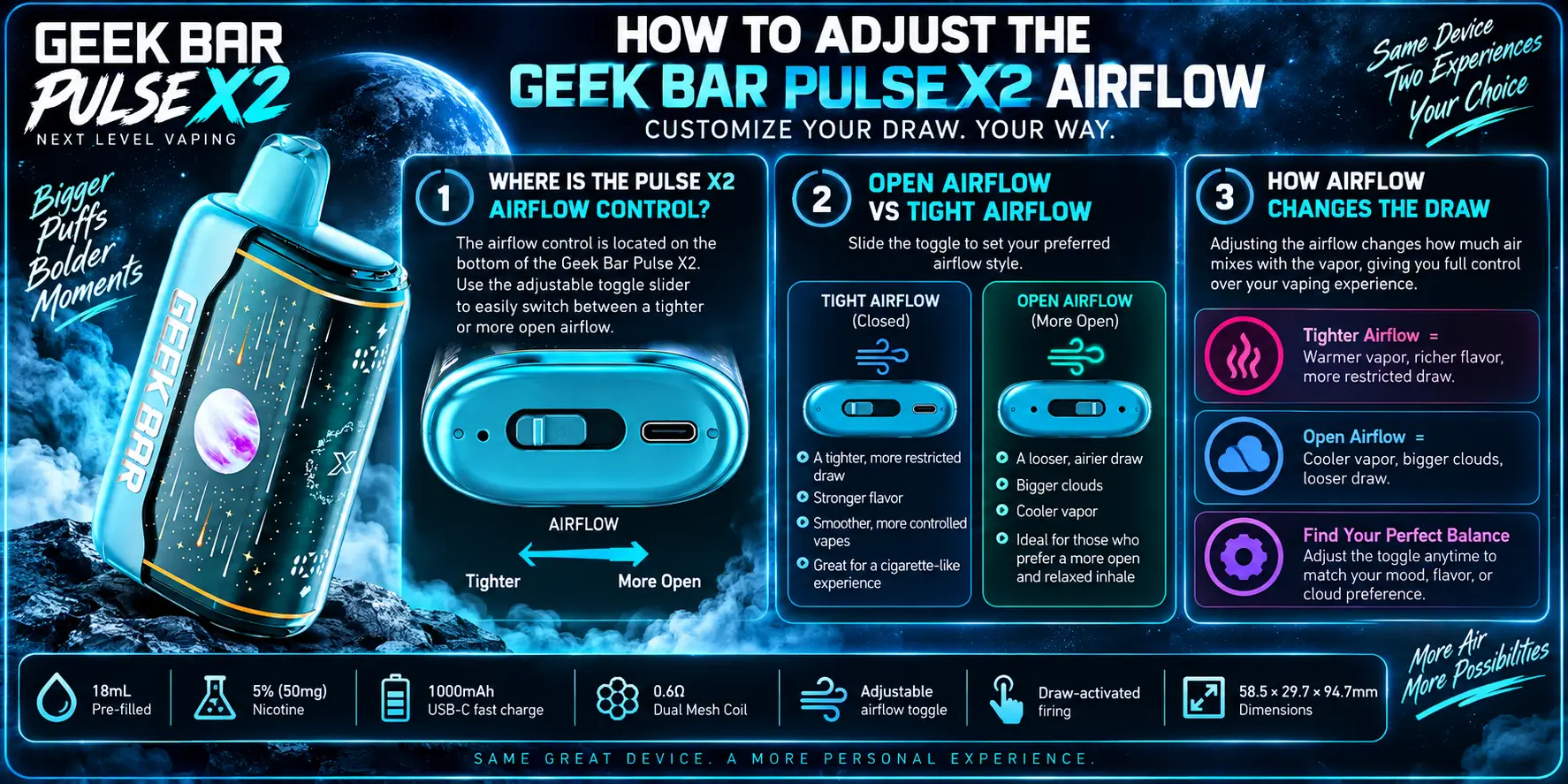
The Pulse X2 uses an adjustable airflow toggle near the base of the device. Sliding it open or closed changes how much outside air mixes into the draw.
Where Is the Pulse X2 Airflow Control?
The toggle sits just above the USB-C charging port. It moves easily between positions with a finger and holds wherever you leave it.
Open Airflow vs Tight Airflow
Opening the toggle lets in more air for a looser, airier draw with bigger clouds. Closing it down tightens the pull for something closer to a cigarette-style drag.
How Airflow Changes the Draw
More airflow cools the vapor and softens throat hit, which is why cloud-focused users tend to run it open. Less airflow concentrates flavor and throat hit per puff.
How to Read the Pulse X2 Display and Settings
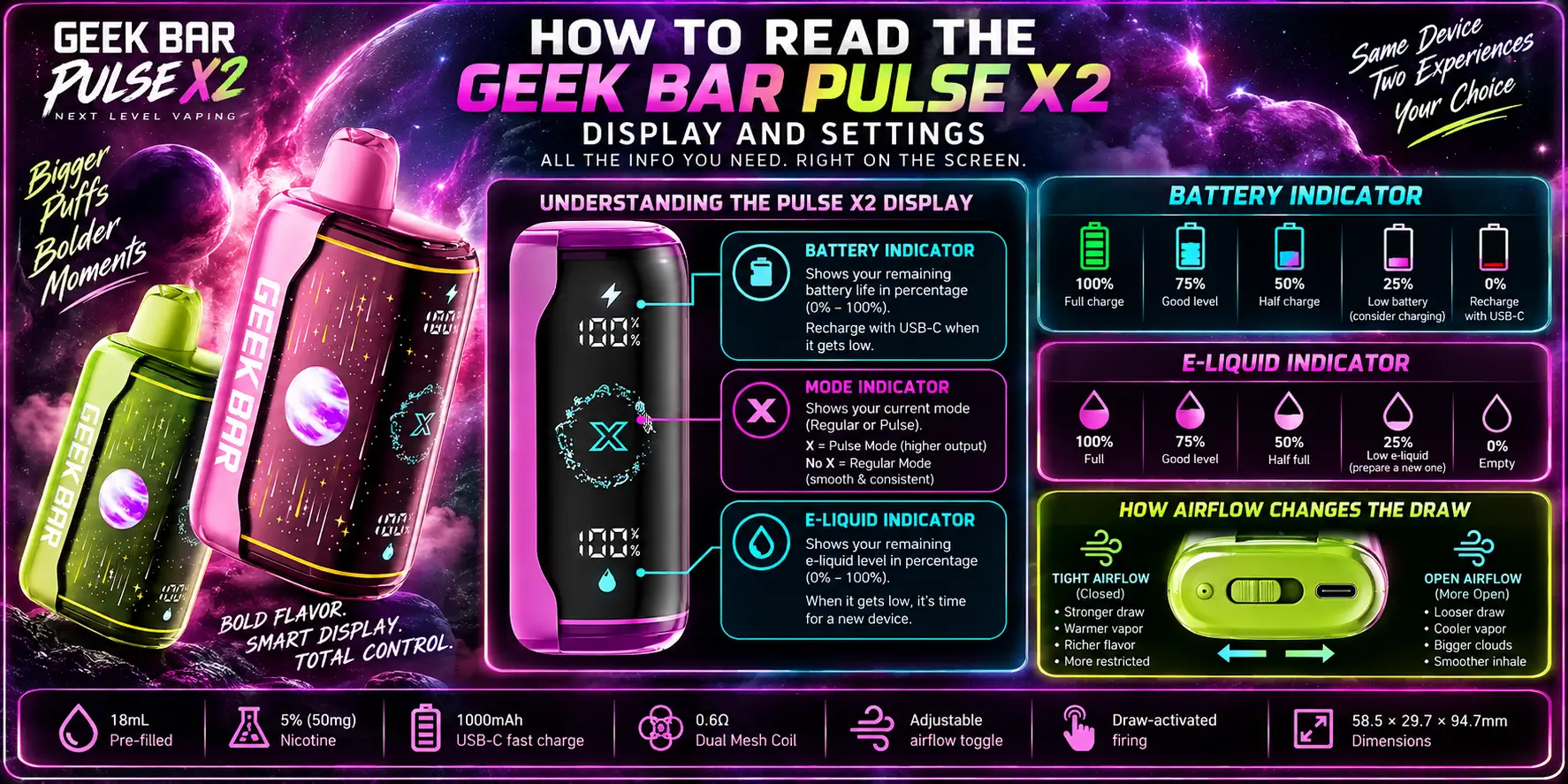
The Pulse X2's digital screen shows two things at a glance: battery level and remaining e-liquid. A quick look tells you exactly when to charge or when you're close to empty.
Battery Indicator
The battery icon fills or empties in segments as the 1000mAh cell drains. When it flashes low, plug in the USB-C cable to charge the Pulse X2 back up.
E-Liquid Indicator
A separate bar tracks how much of the 18mL e-liquid capacity is left. Full details on the fill and flavor profile are covered in our Geek Bar Pulse X2 e-liquid guide.
Best Geek Bar Pulse X2 Settings for Different Draws
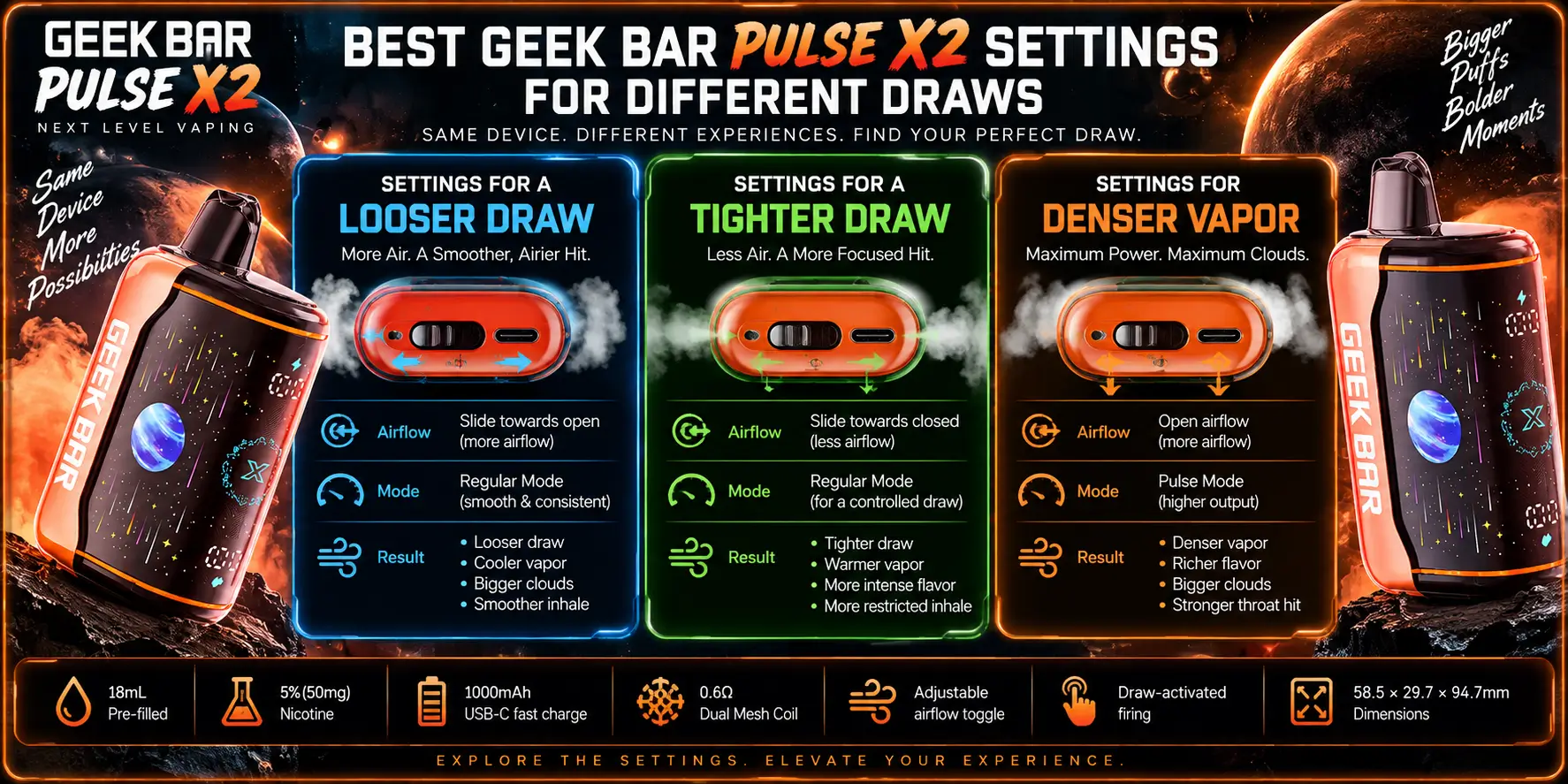
The right mode and airflow combination depends on what you're after. Here's how to set the device for four common preferences.
Settings for a Looser Draw
Open the airflow toggle fully and stay on Regular Mode. This gives an airy, high-volume pull without burning through battery or e-liquid too fast.
Settings for a Tighter Draw
Close the airflow toggle most of the way and keep Regular Mode active. This mimics a firmer, cigarette-style resistance with more concentrated flavor.
Settings for Denser Vapor
Switch to Pulse Mode and open the airflow partway. The extra power maximizes vapor from the dual-mesh coil while the airflow keeps the draw from feeling harsh.
Settings for Longer Device Use
Stick to Regular Mode with airflow closed to moderate. This stretches both the 50,000-puff rating and the 18mL capacity as far as they'll go — see how long that lasts in real use in how long the Pulse X2 lasts.
Common Geek Bar Pulse X2 Settings Questions
1. How do I switch between Regular Mode and Pulse Mode on the Pulse X2?
Mode switching is done with a quick click sequence on the device — firing itself stays draw-activated, so you only need the click to change output level, not to vape. The change is immediate and there's no menu to dig through, which makes it easy to adjust mid-session if you want a stronger hit.
2. Does Pulse Mode drain the battery faster than Regular Mode?
Yes. Pulse Mode pushes more power to the dual-mesh coil on every puff, pulling more from the 1000mAh battery than Regular Mode does. That's a big reason Pulse Mode is rated for up to 25,000 puffs against Regular Mode's 50,000 — the extra output shortens both battery and e-liquid life per session.
3. Can I adjust the airflow while the device is in Pulse Mode?
Airflow and mode are separate controls, so you can run any airflow position in either mode. Many users pair Pulse Mode with a partially open toggle to balance the stronger throat hit against a smoother, cooler draw instead of an overly harsh pull.
4. What does the e-liquid indicator on the display mean?
The e-liquid bar on the digital screen shows roughly how much of the 18mL capacity is left. It drops faster in Pulse Mode because of the higher power draw, so checking it regularly helps you plan ahead instead of running dry mid-session.
5. How fast does the Pulse X2 charge, and does mode affect charging time?
The Pulse X2 charges over USB-C, and charging speed itself isn't affected by which mode you last used. That said, a battery drained faster in Pulse Mode will need a top-up sooner than one used mostly in Regular Mode — for a full breakdown, see Pulse vs Pulse X2 charging.
Geek Bar Pulse X2 Specifications at a Glance
Here's the full spec sheet for the Geek Bar Pulse X2 in one place.
| Spec | Detail |
|---|---|
| Puff Count | 50,000 (Regular) / 25,000 (Pulse) |
| E-Liquid | 18mL pre-filled |
| Nicotine | 5% (50mg) |
| Battery | 1000mAh, USB-C fast charge |
| Coil | 0.6Ω Dual Mesh |
| Airflow | Adjustable toggle |
| Firing | Draw-activated |
| Dimensions | 58.5 × 29.7 × 94.7mm |
Geek Bar Pulse X2 Puff Count
Puff count splits by mode: up to 50,000 in Regular, down to 25,000 in Pulse. For the full methodology behind that rating, see our dedicated Pulse X2 puff count breakdown.
Geek Bar Pulse X2 Dual-Mesh Coil
The 0.6Ω dual-mesh coil spreads e-liquid across a wider surface than single-wire builds, improving flavor accuracy and vapor density in both modes. See how it compares to the original in our dual-mesh coil breakdown.
Geek Bar Pulse X2 Flavors
The X2's 18mL tank supports a full flavor lineup at 5% nicotine strength. Browse the complete list in our Pulse X2 flavors guide.
Geek Bar Pulse X2 Review
Settings aside, real-world performance is what decides whether a device is worth it. Read the full hands-on breakdown in our Geek Bar Pulse X2 review.
Prefer to browse it on a retailer page first? You can also find the Geek Bar Pulse X2 listed there.